![Eaw logo-1.jpg]](https://design.eaw.com/hs-fs/hubfs/Eaw%20logo-1.jpg?height=40&name=Eaw%20logo-1.jpg)
Configuring the Cardioid feature in EAWPilot
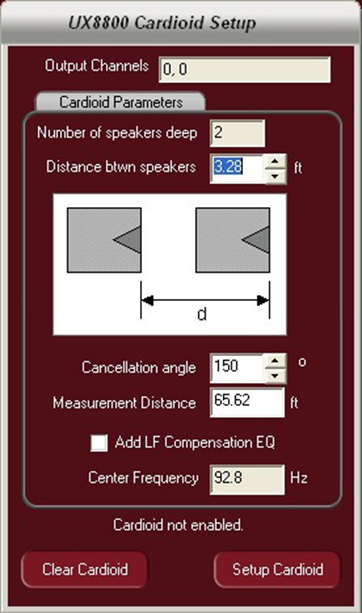
Once the user has configured the subwoofers on the greybox “setup” page, they will be able to align these subs to create a cardioid effect.
- Determine the distance from the face of one subwoofer to The legend on the feature is your guide to determining this. The spacing must be equal regardless of how many subs deep the arrangement is.
- Set the cancellation angle. This tells the software how wide or narrow you wish the forward coverage of the subwoofer array to
- Measurement distance – if close to the array, the angle changes. This parameter is used to adjust the cancellation angle
- LF EQ Compensation – EAW’s technique for creating a cardioid does so at all frequencies but also creates a 6 dB per octave roll off in the extreme low end below the center This selection box applies a +4dB compensation EQ to make up for this loss.
- Center Frequency – Sets the center frequency below which the LF Compensation EQ will be
- Once the data has been entered, hit the “Setup Cardioid” button to create the pattern (note: even though the delay times are not displayed in Pilot for the Cardioid, it has been implemented)
- Hitting the “Clear Cardioid” button cancels the feature.